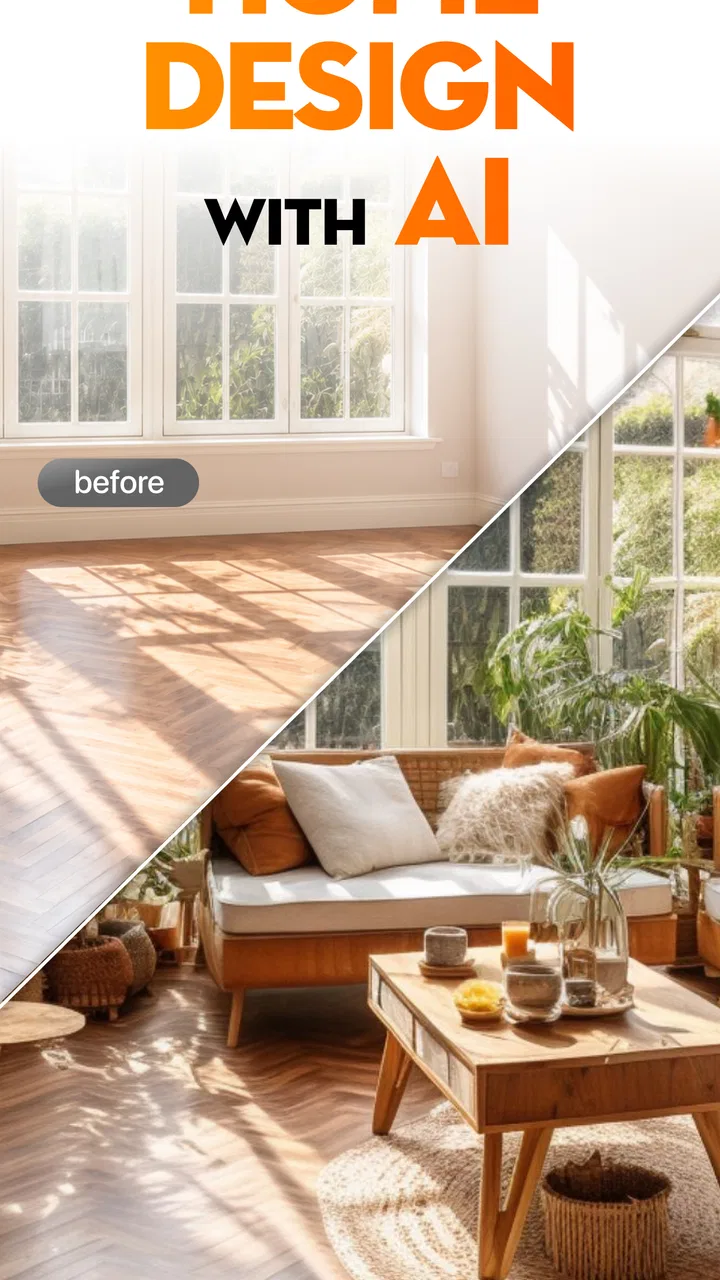
SnapHome: AI Interior Design
- 4.5
- Rating
- 1.00M
- Installs
- Free
- Price

 Analysis by App-foxy
I tried SnapHome: AI Interior Design as a quick way to turn a room photo into a more considered decorating direction, and its main appeal became clear almost immediately: it reduces the intimidating blank-page feeling that often comes with planning a home. Instead of opening a design app and manually building a room from scratch, I could begin with an existing space and use an AI-generated concept as a starting point. That makes it especially interesting for renters, first-time decorators, and anyone who knows a room feels wrong but cannot explain why.
This is a free lifestyle app from iKame Applications - Begamob Global, with an Everyone age rating and support for Android starting with version 8.0. Its current version is 2.1.1, and the app has already passed the one-million-install mark with an average rating of 4.5 from roughly thirty-eight thousand ratings. Those figures suggest that the idea is easy for a broad audience to understand, but popularity alone does not make an AI design suggestion useful. What matters is whether the result helps me make a better decision in a real room.
Turning a real room into a design starting point
I find it useful to begin this section by treating a room photo as a question, not a brief: what should feel different, and what must stay? That small distinction helps me judge a generated idea against the room’s actual constraints instead of being swept along by a polished image. Next, I look at how the app’s reliance on connectivity can shape that photo-to-idea process.
You May Also Like

 Blood Strike: 2.5 Anniversary
Blood Strike’s Loadouts Turn Every Drop Into a Tactical Gamble
A close look at Blood Strike’s custom loadouts: how fast access to signature weapons reshapes its battle royale rhythm, rewards preparation, and narrows the gap between fights.

 Pandora - Music & Podcasts
Pandora’s Music Is Easy to Start, but Harder to Recover
Pandora’s strength is its low-effort path from a seed to a station. Its weak spot is how much confidence it asks you to place in connection, setup, and quiet recovery.

 8 Ball Pool
 Is Built on Rivalries, Rematches, and Routine
A close look at the rivalries, rematches, shared routines, and unanswered safety questions that turn a quick pool match into a persistent mobile community.

 Samsung Music
’s Quiet Strength Is Playing What You Already Own
Its reach comes less from spectacle than from dependable access to a personal library. That simplicity is both the app’s strongest retention engine and its ceiling.

 AccuWeather: Weather Radar
AccuWeather Review: A Quick, Clear Forecast for Everyday Decisions
For everyday plans, the best forecast is the one you can understand quickly. AccuWeather makes rain timing, radar, and local conditions easy to act on, with a few trade-offs.

 Hill Climb Racing
Why Hill Climb Racing Still Turns Crashes Into One More Run
A tiny car, a bumpy hill and one more upgrade: Hill Climb Racing keeps resurfacing because its simple chaos makes every near-miss feel personal.
More From Our News Desk



The useful capability is visual direction, not a finished renovation plan
The strongest part of SnapHome is its focus on creating AI interior design ideas from a visual starting point. I found that distinction important. The app is not a replacement for an architect, contractor, or detailed room-planning service. Its value is closer to having a fast visual brainstorming partner: I can look at a room, ask myself what atmosphere I want, and use an AI interpretation to explore a possible direction before spending money.
That is a practical role because many decorating decisions are difficult to imagine from words alone. “Warm but uncluttered” sounds simple until I have to choose a wall color, furniture style, lighting mood, and arrangement that all work together. A generated concept can make those relationships easier to discuss. Even when I do not copy the result, it can reveal a combination I would not have considered on my own.
I also appreciate that the idea extends beyond living rooms and bedrooms. The app is positioned around home design, interior design, and garden design, so it can be useful when the problem is not strictly about furniture. A garden corner, balcony, entrance, or awkward open area can benefit from the same visual prompt: show the space, establish a mood, and see what kind of transformation feels plausible.
The key is to treat the image as a suggestion rather than a promise. AI visuals are persuasive because they look finished, but a beautiful concept may quietly ignore the things that make a room difficult in everyday life: door swings, radiators, storage needs, uneven walls, natural light, pets, children, or the fact that a sofa must actually fit through the entrance. I get the most from SnapHome when I use it to choose a direction, then return to the physical room and test every decision against reality.
Why the photo-first approach feels more approachable
Traditional interior-design tools often ask for measurements, floor plans, furniture dimensions, or a fairly strong understanding of design software. Those tools have an important advantage when precision matters, but they can be too demanding for a casual decorating question. SnapHome lowers the entry barrier by letting the existing room carry much of the context.
That makes the app feel more like a conversation with an image than a technical drafting exercise. I do not need to know the name of a design style before exploring it. I can start with a room that feels dated or unfinished and judge the visual result by instinct. For someone who is choosing between a calmer neutral look and a more expressive color scheme, that immediate comparison is more useful than reading a long list of style descriptions.
There is also a psychological benefit. A person may hesitate to repaint a room because the decision feels expensive and irreversible. Seeing a concept first creates a low-risk pause between the idea and the purchase. It does not guarantee that the change will work, but it can prevent a completely blind decision.
How I would use it in practice
I would begin with a clear photo rather than a rushed snapshot. A tidy room is not essential, but removing temporary clutter helps the generated concept focus on the permanent structure. I would also take the image from a position that shows the main walls, windows, and furniture relationships. A close-up of one chair may produce an attractive image, but it gives less useful context for planning the whole space.
Next, I would decide what question I want the image to answer. “Make this better” is too vague for my own thinking, even if the app can interpret it. More useful questions are: could this room feel brighter without replacing the floor; would a softer style make the existing furniture work; can this empty corner become a reading area; or what kind of garden atmosphere suits this small outdoor space?
This is one of the less obvious ways to get better value from an AI design tool: use it to compare decisions, not merely to request a pretty makeover. If I ask for several different visual directions, I can identify which elements remain appealing across them. Perhaps the consistent preference is warmer lighting, less visual clutter, or a particular balance between open space and storage. That repeated pattern is more trustworthy than one dramatic image.
I would save the most convincing concept and annotate it outside the creative moment. Which details are genuinely practical? Which are only decorative? Is the proposed furniture similar to what I already own, or has the image quietly replaced everything? This second pass prevents the excitement of the generated picture from turning into an unrealistic shopping list.
A realistic everyday scenario
Imagine I am preparing a small living room before moving into a new apartment. I own a sofa, a television, and a narrow bookcase, but I have not decided where anything should go. The room looks plain in photographs, and I am tempted to buy accessories immediately. Instead, I use SnapHome to explore a few directions based on the actual space.
One concept may make me realize that the room needs fewer small decorations and a stronger focal point. Another may show that the bookcase looks better away from the television wall. A third may make a warmer palette feel more suitable than the cool gray I had planned. None of those images tells me exactly what to buy, but they help me avoid buying random items that do not solve the underlying problem.
I would then measure the available wall and floor areas myself, check the position of outlets and windows, and decide which existing pieces deserve to stay. In this scenario, the app is valuable because it improves the order of decisions: visual direction first, practical checks second, purchases last. That workflow can save more frustration than any single generated image.
Where it fits beside ordinary alternatives
Compared with browsing social-media inspiration boards, SnapHome has the advantage of starting with my own room rather than someone else’s finished home. Inspiration boards are excellent for collecting colors and moods, but they can encourage unrealistic comparisons. A generated concept tied to my space is more relevant, even if it remains imperfect.
Compared with manual room-planning software, SnapHome is faster for early exploration and less intimidating for people who do not want to learn a design interface. Manual tools remain better when I need exact dimensions, accurate furniture placement, or a dependable plan for construction. I would not use an AI concept as the final authority for built-in cabinetry, structural changes, electrical work, or a costly renovation.
Compared with hiring a professional designer, the app is obviously more accessible for casual experimentation, but it cannot replace professional judgment. A designer can ask about lifestyle, budget, materials, maintenance, accessibility, and long-term use in a way an automated visual concept cannot fully replicate. SnapHome makes more sense before that conversation, or when the project is small enough that I mainly need ideas.
The tradeoffs I noticed while judging the results
The biggest tradeoff is the gap between visual appeal and physical accuracy. AI-generated rooms tend to communicate mood very effectively, but the image can make a difficult layout look effortless. Furniture may appear better proportioned than it would be in real life, and decorative details may distract from circulation space. I would never assume that an attractive arrangement is automatically a workable one.
A second tradeoff is originality versus control. The surprise element is part of the fun: the app may suggest a direction I did not expect. At the same time, that means I should not rely on it when I need strict preservation of particular objects or exact placement. If the room contains a treasured cabinet, an unusual window, or a fixed feature, I would judge the output by how well it respects those constraints rather than by how polished it looks.
There is also a financial consideration. SnapHome is free to install and use as a no-cost entry point, while in-app purchases range from $6.99 to $39.99 per item. That makes it easy to try before deciding whether the experience deserves additional spending, but I would pay attention to the purchase flow and make sure I understand what each item provides before committing. For a single decorating experiment, the free experience may be enough; someone planning several rooms may evaluate the paid options more carefully.
The app is therefore not automatically the best choice for every user. If I only need a precise floor plan, a measurement-based planner would be more appropriate. If I already know exactly which furniture I will buy, a product-layout tool may answer my question better. And if I am making a major renovation decision, professional advice and physical measurements matter more than an attractive AI visualization.
Three ways to get more than a generic makeover
First, I would photograph the same room from more than one useful angle and use the images to check whether an idea survives a change of viewpoint. A concept that looks convincing from one corner may reveal an awkward walkway or blocked feature from another. This turns the app from a one-image novelty into a small consistency check.
Second, I would use it before shopping for accessories, not after. It is easy to buy cushions, lamps, plants, and wall art because each item looks appealing alone. A design concept can help me identify the few visual roles the room actually needs, such as a focal point, softer lighting, or a stronger connection between two areas. That encourages deliberate purchases instead of accumulation.
Third, I would separate fixed elements from changeable ones in my own evaluation. Floors, windows, doors, and built-in storage define the limits of the room, while paint, textiles, lighting, and movable furniture are easier to change. If the generated idea depends on replacing every fixed element, it is less useful to me than a modest concept that works with what is already there. This is where personal judgment matters more than the image’s polish.
Who will gain the most from SnapHome?
I think the best audience is someone at the beginning of a decorating project. You may have a room photo, a vague preference, and a desire to see possibilities without learning complex software. The app is also a good fit for renters who want to explore reversible changes, homeowners comparing moods before repainting, and people preparing to explain their taste to a partner or decorator.
It can be particularly helpful when two people disagree about a room. Instead of arguing from abstract descriptions, we can compare visual directions and identify the parts we both like. That does not solve the whole design problem, but it changes the conversation from personal taste versus personal taste into a more concrete discussion about light, color, openness, and furniture balance.
Garden and outdoor ideas may appeal to users who struggle to imagine how a neglected corner could feel after a refresh. The same caution applies there: weather, drainage, maintenance, local conditions, and plant suitability still require real-world research. The visual concept can establish an atmosphere, but it should not be treated as horticultural or construction guidance.
I would recommend skipping it if I wanted exact technical planning, dependable dimensions, or a shopping list that matches real products. I would also skip relying on it as the sole basis for a high-cost renovation. Its strength is speed and imagination, not engineering precision.
My final take after using it as a planning companion
SnapHome: AI Interior Design works best when I ask it to help me think, not to make every decision for me. Its central capability—turning a home or outdoor space into an AI-led design direction—can make early planning more concrete and less intimidating. I found that most useful when the room was not completely empty but simply lacked a clear identity.
The free price makes experimentation approachable, while the Everyone rating and Android 8.0 compatibility keep the basic audience broad. The developer, iKame Applications - Begamob Global, has built an app around a familiar frustration: wanting a better-looking space without knowing where to begin. The strong rating and large install base reinforce that the concept has wide appeal, though they do not remove the need for practical judgment.
My recommendation is to use it as a visual sketchbook. Take sensible photos, ask focused questions, compare more than one direction, and verify every appealing idea against measurements, movement, maintenance, and budget. The smartest result is not the most luxurious image; it is the concept that helps me make one realistic improvement with confidence. Used that way, SnapHome earns a place beside inspiration boards and room planners, especially for the uncertain first stage when a little visual clarity can prevent a lot of aimless shopping.
FAQs for SnapHome: AI Interior Design
01What is SnapHome: AI Interior Design and how does it work?
SnapHome: AI Interior Design is an app that uses artificial intelligence to suggest interior design ideas from photos of your rooms. After uploading or taking an image, you can typically explore different styles, color combinations, furniture arrangements, and decorative concepts. It is designed as a visual inspiration tool, helping you imagine possible transformations before making real changes to your home.
02Can SnapHome redesign any room from a photo?
The app is intended for common indoor spaces such as bedrooms, living rooms, kitchens, dining areas, offices, and other rooms. Results can vary depending on the photo quality, lighting, camera angle, and how clearly the room is visible. It may produce more convincing suggestions when the image is well framed and uncluttered, but generated designs should be treated as concepts rather than exact renovation plans.
03Is SnapHome: AI Interior Design free to download and use?
SnapHome may be available to download at no initial cost, but some features, design styles, image generations, or advanced tools can be restricted by in-app purchases or a subscription. Before using the app extensively, check the current pricing, trial conditions, renewal terms, and cancellation instructions shown in the Google Play Store or Apple App Store, since availability and plans may change.
04Does SnapHome provide accurate furniture measurements or professional design plans?
SnapHome is best used for inspiration and visualization, not as a replacement for an interior designer, architect, contractor, or measuring application. AI-generated images may change proportions, windows, doors, furniture dimensions, or structural details. Always confirm measurements independently and consult a qualified professional before purchasing furniture, ordering materials, changing electrical layouts, or beginning construction work.
05What should I know about privacy when uploading room photos?
Before uploading images, review SnapHome’s privacy policy and the permissions requested by the application. Room photos may contain personal belongings, family members, addresses, documents, or other sensitive information, so remove anything private whenever possible. Also check how images are stored, processed, shared, and deleted, particularly if the app uses cloud-based AI services to generate its design suggestions.
Pros
- Generates room makeovers quickly from uploaded photos.
- Offers multiple interior styles for varied design inspiration.
- Useful for visualizing furniture and color changes before renovating.
- Simple interface makes experimentation accessible to non-designers.
- Can provide fresh ideas when you are unsure how to decorate.
Cons
- AI results may distort room proportions or architectural details.
- Some features or designs may require a paid subscription.
- Output quality depends heavily on lighting and photo composition.
- Suggested furniture may not match locally available products.
- Privacy concerns may arise when uploading photos of your home.

SnapHome: AI Interior Design
Gallery